Off 2 v1.4 — Aircraft WiFi Integration, Apple Watch & Smarter Tracking

Off 2 v1.4 is a major update that brings aircraft WiFi integration, an Apple Watch companion app, and smarter position tracking to your flight companion.

Aircraft WiFi Integration

Off 2 now reads position data directly from the aircraft’s flight management system when you’re connected to onboard WiFi. No configuration needed — just connect to the cabin WiFi and Off 2 detects the source automatically.

Supported systems:

  • Air France — Onboard, Connect, and Freewifi networks
  • Viasat — Used by many US and international carriers
  • Panasonic Avionics — With bonus meteorological data (headwind/tailwind, OAT, wind direction)

This gives you FMS-computed distance remaining, ground speed, and time to destination — more accurate than GPS because it follows actual airways rather than great circles. When both GPS and WiFi data are available, Off 2 intelligently combines them and saves battery by throttling GPS updates.
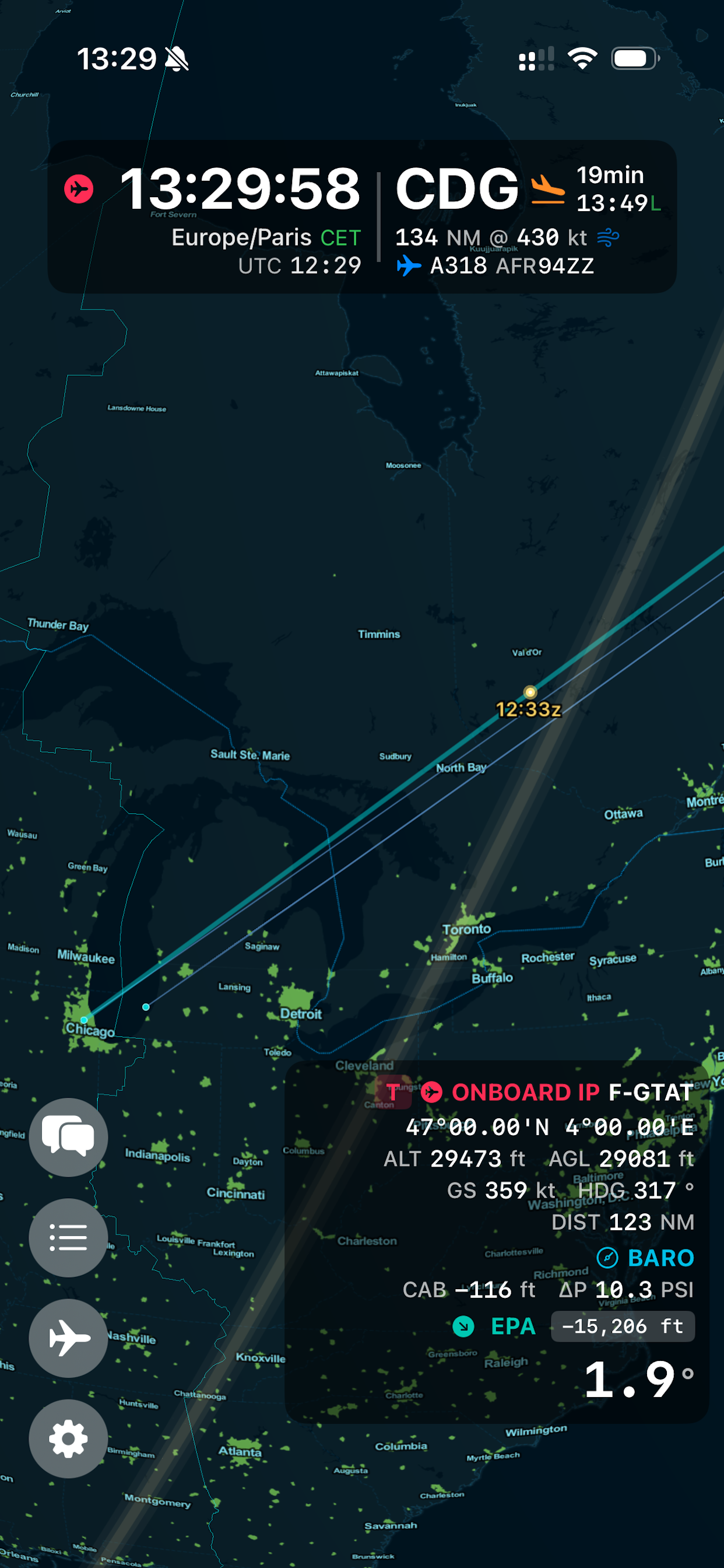
Off 2 flight tracking with aircraft WiFi data

Apple Watch Companion

The new Apple Watch app brings Off 2 to your wrist with quick message buttons for crew communication. Send pre-defined cabin status messages — ARM, TKO, TRB, COF, 100, LDG, DIS — directly from Apple Watch via the peer-to-peer network. Perfect for cabin crew coordination without pulling out your phone.
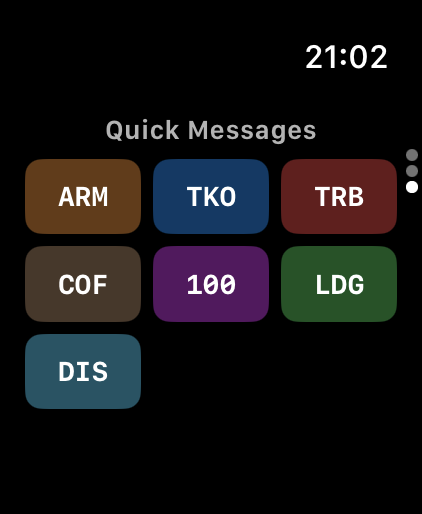
Off 2 Apple Watch quick messages

Smarter Position Tracking

Under the hood, Off 2 v1.4 completely rethinks how it computes speed and time to destination from WiFi sources. A sliding-window linear regression replaces the old two-point speed calculation, delivering much smoother ground speed readouts and more reliable ETA predictions — especially during doglegs and holding patterns.

Position source indicators now show live staleness states: teal for active WiFi data, degrading to orange (>30s) and red (>60s) when data goes stale. A subtle pulse animation on the source icon confirms data is flowing.

Other improvements

  • GPS freeze detection — Detects when cached GPS data hasn’t moved in 120+ seconds at altitude, preventing stale position data from poisoning calculations
  • GPS watchdog — Automatic recovery with exponential backoff when GPS updates stop arriving
  • MPC peer improvements — Persistent unique peer IDs, deterministic tie-breaking, and periodic rediscovery prevent silent connection failures
  • Live Activity throttle — Foreground updates limited to 10-second intervals to prevent iOS from disabling the Live Activity
  • WhirlyGlobe rendering — Faster tile loading and better caching for smoother globe manipulation

Off 2 is available on iPhone, iPad, Mac, Apple Watch, and Apple Vision Pro — $3.99 on the App Store.

‼️Aviation Security: Why your airline shouldn’t use self signed certificates

To make it short, and beyond basic IT related reasons, because IT security for an airline is directly linked to Aviation security and passengers safety.

What are the risks associated with self-signed certificates? Mainly:
• Leave the door open for various attacks, intercepting or corrupting information
• Train users to be less securelock

Here is a bit of reading about it:
https://en.wikipedia.org/wiki/Self-signed_certificate
or Google about «risk self signed certificate»

There are multiple ways to skin a cat, so let’s focus on one of them applied to Windows running Wildfly, «free», easy to implement, using automatic renewal. Here are some few steps which will put your operation back to an acceptable level of security using Let’s encrypt free SSL/TLS certificates

Note that the self-signed certificate is just one aspect among others, and if you skipped this one, it would be very wise to discuss privately about some other potential vulnerability aspects. Contact us directly in private: contact@feel.aero

Here are some few steps that you should pass to your EFB admin or IT department.

Download the binary build of letsencrypt for Windows there:
https://www.win-acme.com/
At this time, the latest version is 2.1.12 64bits (Upper banner link)

Unzip and move the folder under C:\Program Files\win-acme

Modify or replace the Script\ImportJKS.ps1 by:
• Specifying the correct java path for your installation
Set-Alias keytool "C:\Program Files\Java\jre1.8.0_181\bin\keytool.exe"
• Add -deststoretype pkcs12 to both keytool calls

I left the default password ‘airbus’ for the keystore unchanged to ease the setup, but it’s a good practice to change it based on the documentation, as well as the default port 8443, subject to frequent scans.

Place the attached script in the win-acme folder. It stops the Wildfly service, moves the .jks, creates or renews the certificate, and starts the service again

The first launch has to be executed manually «as an administrator» because it’s interactive. Accept all options.

Finally, go to modify in «task scheduler» the task which was generated:
• Set the trigger to 60 days instead of 1, as recommended by letsencrypt (Certificates are valid for 90 days)
• Change the action to launch C:\Program Files\win-acme\cert-fsa.bat (Starts in C:\Program Files\win-acme\)

cert-fsa.bat

@echo off

set HOST=fsa.yourdomain.com
set KEYSTORE=C:\Airbus\Wildfly\standalone\configuration\fsa-keystore.jks
set KEYSTOREPASS=airbus

sc stop wildfly

:loop
sc query wildfly | find "STOPPED"
if errorlevel 1 (
  timeout 1
  goto loop
)

move /Y %KEYSTORE% %KEYSTORE%.old

wacs.exe ^
    --target manual ^
    --host %HOST% ^
    --store none ^
    --installation script ^
    --script "Scripts\ImportJKS.ps1" ^
    --scriptparameters "\"{CacheFile}\" \"{CachePassword}\" \"%KEYSTORE%\" %KEYSTOREPASS% %KEYSTOREPASS%"

if not exist %KEYSTORE% (
    move /Y %KEYSTORE%.old %KEYSTORE%
)

sc start wildfly

Scripts/ImportJKS.ps1

param(
    [Parameter(Mandatory=$true)]
    [string]
    $PfxFile,
    
    [Parameter(Mandatory=$true)]
    [string]
    $PfxPassword,

    [Parameter(Mandatory=$true)]
    [string]
    $KeyStoreFile,

    [Parameter(Mandatory=$true)]
    [string]
    $KeyStorePassword,
    
    [Parameter(Mandatory=$false)]
    [string]
    $KeyStoreKeyPassword
)

Set-Alias keytool "C:\Program Files\Java\jre1.8.0_181\bin\keytool.exe"
echo "Keystore $KeyStorePassword"
if ([string]::IsNullOrEmpty($KeyStoreKeyPassword)) 
{
    keytool `
        -v `
        -noprompt `
        -importkeystore `
        -srckeystore "$PfxFile" `
        -srcstoretype PKCS12 `
        -srcstorepass "$PfxPassword" `
        -destkeystore "$KeyStoreFile" `
        -deststorepass "$KeyStorePassword" `
        -deststoretype pkcs12
} 
else 
{
    keytool `
        -v `
        -noprompt `
        -importkeystore `
        -srckeystore "$PfxFile" `
        -srcstoretype PKCS12 `
        -srcstorepass "$PfxPassword" `
        -destkeystore "$KeyStoreFile" `
        -deststorepass "$KeyStorePassword" `
        -destkeypass "$KeyStoreKeyPassword" `
        -deststoretype pkcs12
}