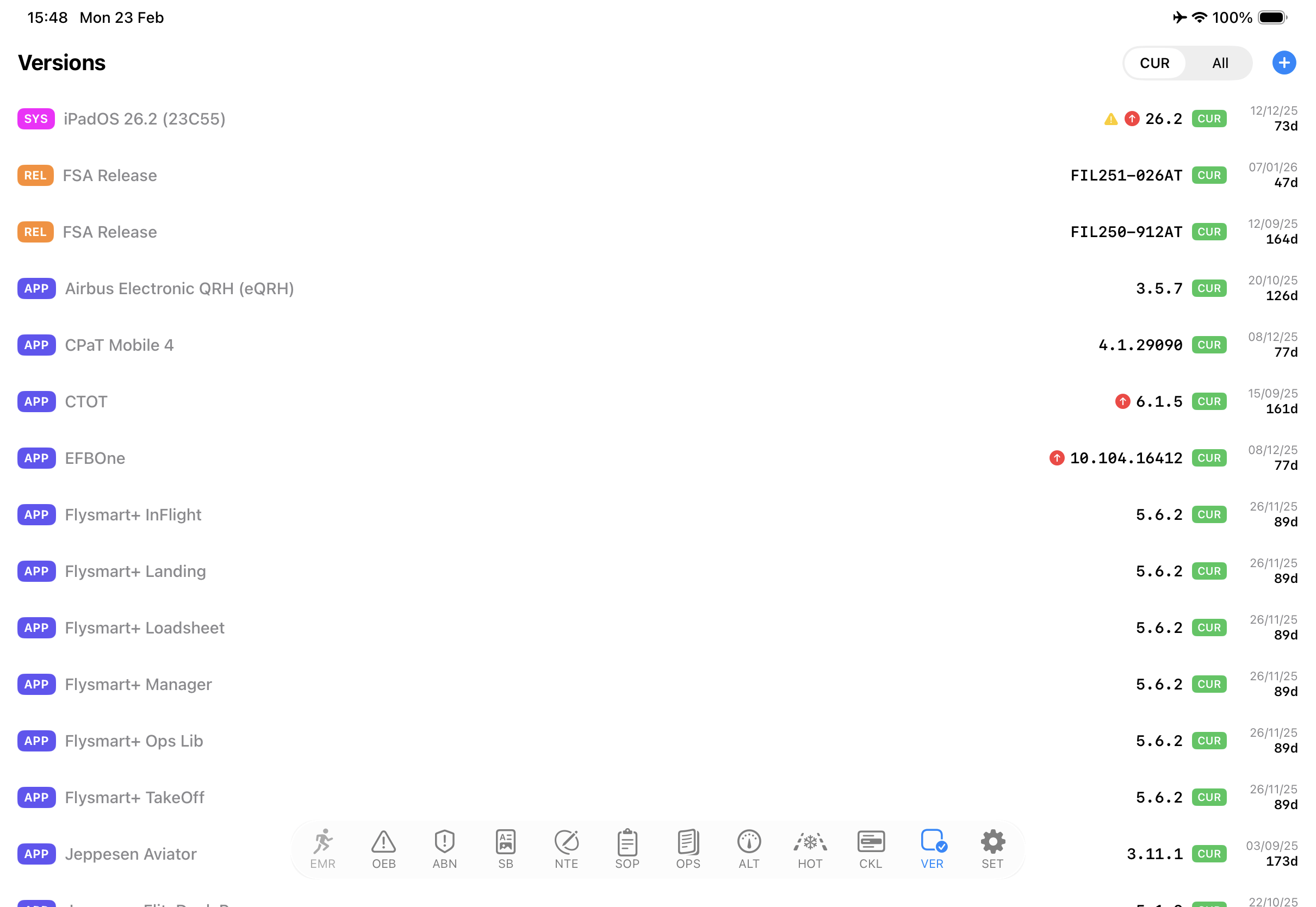
sQRH 4.0 introduces the Versions (VER) module — a new tab to track all your EFB apps and system versions in one place.
What does VER do?
VER gives you a single dashboard to monitor every app in your EFB ecosystem — iPadOS, FlySmart+, CPaT, CTOT, EFBOne, and sQRH itself. Each entry shows the current version, status (CUR/ARC/BTA), issue date, and age in days.
App Store update check
Pull down to refresh and VER checks the App Store (via iTunes Lookup API) and Apple’s RSS feed for newer versions. If an update is available, a red badge appears next to the entry — so you always know which apps need updating before your next flight.
Standalone or server-connected
VER works in two modes:
- Standalone — Manage versions locally on your device. Create, edit, and archive entries manually.
- BLINK/FSA server — If your airline runs a BLINK server, VER syncs automatically on launch. Version records are pushed from the server, keeping the entire fleet in sync.
Also new in sQRH 4.0
- Cockpit Checklist Sync — Pair two iPads via QR code for live checklist sync over encrypted MultipeerConnectivity
- Quick-Access Menu — Long-press SET to jump to hidden tabs without opening Settings