No-ICE
Real-time de-icing hold-over time manager with official FAA and Transport Canada tables.

- Official FAA and Transport Canada hold-over time tables, Winter 2026-27 edition — fluid types I, II, III, and IV
- Precision timer with Live Activity, Dynamic Island and Nearby Share — v2.2 lets you set the timer start to when the final fluid application began and marks holds while the time keeps counting
- On iPhone, iPad, Mac (M1+) for €2.99 and on Android, no data collected — and for operators, a Type B EFB approval package (EASA SPA.EFB.100) with an accuracy test of every printed table cell
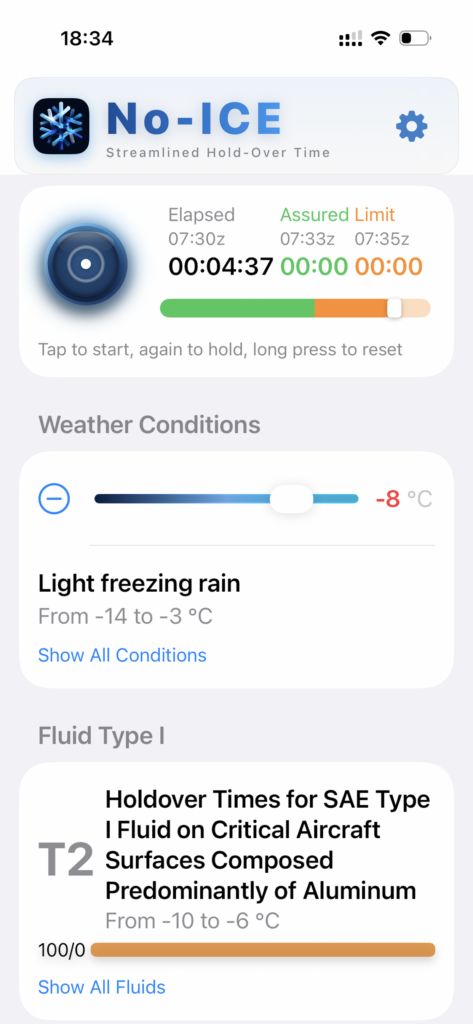
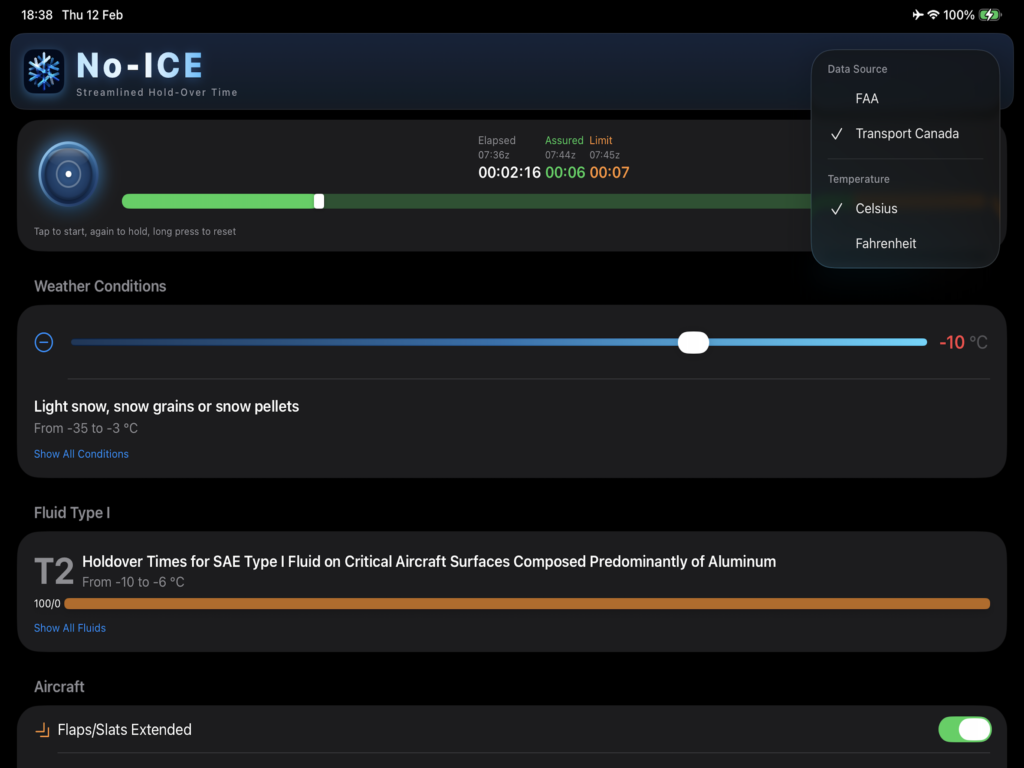
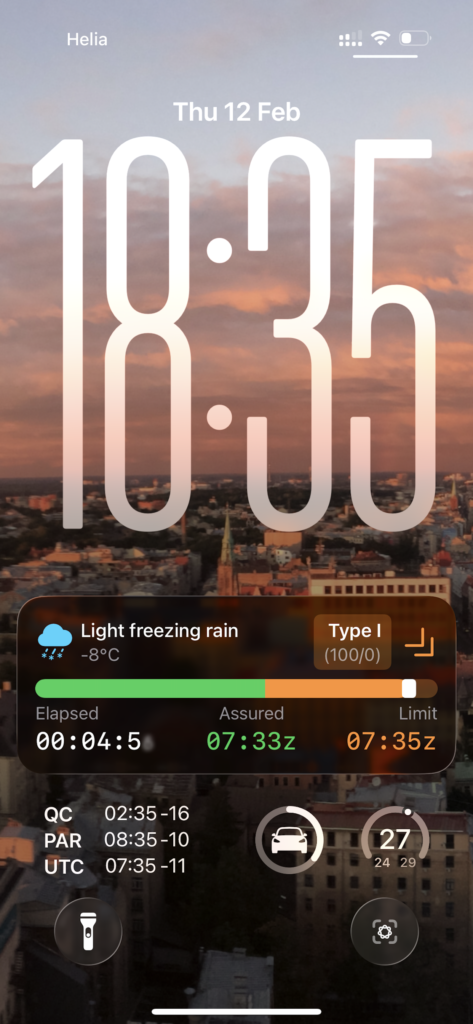
No-ICE is a professional de-icing decision tool for pilots and flight crew. It provides immediate access to official FAA and Transport Canada hold-over time tables and runs a precision countdown timer that stays visible on the lock screen and Dynamic Island — so you can monitor remaining protection time without breaking the pre-departure flow.
Version 2.0 was a redesign of the whole app and added Nearby Share, so the whole crew can work from the same timer. Version 2.1 adds a device integrity check: No-ICE won’t run on a jailbroken iPhone or iPad. It carries the Winter 2026-27 tables for both authorities.
New in version 2.2. Tap the start time to set it to when the final fluid application began, as given in the anti-icing code. A tap on the running timer marks a hold while the hold-over time, its bar and the lock screen keep counting. With flaps/slats deployed, No-ICE shows the holdover times of Appendix A of the guidelines.
Hold-over time tables
No-ICE contains official hold-over time (HOT) data for fluid types I, II, III, and IV as published by the FAA and Transport Canada. Tables cover the full range of precipitation types and intensities defined in regulatory guidance, including:
- Light, moderate, and heavy precipitation — snow, freezing drizzle, freezing rain
- Outside air temperature ranges — from near 0°C down to the operational limits of each fluid type
- Flaps/slats deployed — the holdover times of Appendix A of the guidelines (version 2.2)
The current edition holds 56 tables per authority, covering every approved fluid — including the additions for the 2026-27 season: LNT Solutions P250 in Type II, and LNT Solutions P450, MAX TECH MTL 4-EG and MAX TECH MTL 4-PG in Type IV. AVIAFLUID AVIAFlight EG was withdrawn by the publishers for this season; its PG counterpart remains.
Fast fluid selection
- Colour-coded fluid types — Type I to IV pills in the real dye colours, with the number of approved products for the current condition
- Search and recents — products listed by brand and name, with your three most recent fluids at the top
- Mix chips — 100/0, 75/25 and 50/50 with their assured and limit times, one tap to switch
Precision timer
The core of No-ICE is a high-precision countdown timer that starts from the selected hold-over time and runs throughout the pre-departure sequence:
- Timer start — set it to when the final fluid application began, as given in the anti-icing code (version 2.2)
- Hold marks — mark each check during interrupted sequences or ground delays; the hold-over time keeps counting
- Visual feedback — colour progression as HOT approaches expiry
- Haptic feedback — tactile alerts for eyes-free operation during busy phases
- Live Activity — hold-over countdown visible on the iPhone lock screen without unlocking
- Dynamic Island — persistent timer display on supported iPhone models
Nearby Share
When a second iPhone or iPad with No-ICE open comes within Bluetooth range, the share button under the settings gear starts to glow and shows how many devices are nearby. One tap sends the running timer, weather condition, temperature, fluid, mix, flaps setting and table source to all of them. The receiving crew member sees a summary — including a warning if it would replace their own running timer — and confirms before anything changes. No pairing, no network, no server.
Device integrity
At launch, No-ICE checks that the iPhone or iPad has not been jailbroken. On a jailbroken device it shows a “Device integrity compromised” notice instead of hold-over times, because the integrity of the app and its tables can no longer be guaranteed there. The check runs entirely on the device, with no network and no third-party service. Standard devices are unaffected, and No-ICE on Mac runs as before.
For operators: EFB approval package
Under EU air operations rules, a commercial air transport operator may use a Type B EFB application only once its competent authority has approved that use (SPA.EFB.100). The approval belongs to the operator, and the evidence must cover the application and the host device it runs on. To support that application, FEEL.AERO provides a Type B EFB approval package for No-ICE 2.2, available to operators on request — contact us.
The accuracy test at its core compares No-ICE with every printed cell of the FAA and Transport Canada Winter 2026-27 tables — standard and Appendix A, in °C and °F — and records the result of each test point.
| Document | What it answers |
|---|---|
| 00 Overview | Package status, contents and how the operator uses it, step by step |
| 01 Application description and classification | What No-ICE does and why it is a Type B application |
| 02 EFB risk assessment | Hazards, mitigations and the backup when the app is unavailable (generic, completed by the operator) |
| 03 HMI assessment | Readability, inputs, alerts and workload, assessed against the EFB HMI criteria |
| 04 Administration, procedures and training inputs | Material for the EFB policy manual, OM-A 8.9 and crew training |
| 05 Host platform suitability | The software side of the host device evidence (the operator adds its device evidence) |
| 06 Accuracy test protocol | How every printed cell is tested |
| 07 Accuracy test report | The results, with a workbook (one row per printed cell) and the file of every test point |
| 08 Compliance matrix | SPA.GEN.105 and SPA.EFB.100 requirements and where each is met |
| 09 Operational evaluation | The evaluation plan and the final report template |
The operator completes its own parts (fleet, procedures, host device, training), runs the operational evaluation and applies to its authority.
Android
No-ICE is also available for Android phones and tablets on Google Play, with the same tables, timer, lock-screen notification and Nearby Share. Version 2.2 is out on Android too. It lets you set the timer start to when the final fluid application began, as given in the anti-icing code; marks holds while the hold-over time keeps counting; and shows the holdover times of Appendix A of the guidelines when flaps/slats are deployed.
Platform support
| Platform | Minimum version |
|---|---|
| iPhone | iOS 17.0+ |
| iPad | iPadOS 17.0+ |
| Mac | macOS 14.0+ (Apple Silicon M1+) |
| Android phones and tablets | Android 8.0+ |
App size: 8 MB. Supports Celsius and Fahrenheit. English language.
Privacy
No-ICE collects no data. There is no account, no telemetry, no network requirement. All calculations — including the device integrity check — run on-device, and Nearby Share goes directly from device to device over Bluetooth. Read the full privacy policy.
Frequently asked questions
What is a de-icing hold-over time and why does it matter?
Hold-over time (HOT) is the estimated time that de-icing or anti-icing fluid remains effective after application, protecting critical surfaces from ice contamination. Exceeding HOT before takeoff is a serious safety risk — No-ICE keeps the timer visible and accessible so pilots can monitor it without distraction.
Which fluid types does No-ICE support?
No-ICE covers all four standard de-icing fluid types — Type I, II, III, and IV — across the full range of weather conditions defined in FAA and Transport Canada guidance.
Which regulatory tables does No-ICE use?
No-ICE uses official hold-over time data published by the FAA (Federal Aviation Administration) and Transport Canada. These are the same tables referenced in airline operations and accepted by major civil aviation authorities.
How often are the tables updated?
Once a year. The FAA and Transport Canada publish revised hold-over time tables ahead of each northern-hemisphere winter, and No-ICE ships an app update carrying the new season before it begins. No-ICE carries the Winter 2026-27 edition, with 56 tables per authority covering every approved fluid.
Can my airline get No-ICE approved as an EFB application?
The approval belongs to the operator, not to the app. FEEL.AERO provides a Type B EFB approval package for No-ICE 2.2 that gives an EASA operator what it needs to apply to its competent authority under SPA.EFB.100 — description and classification, risk and HMI assessments, administration and training inputs, host platform suitability, an accuracy test protocol and report, a compliance matrix and an operational evaluation plan. Contact us to receive it.
How does Nearby Share work?
The share button under the settings gear lights up when another iPhone or iPad with No-ICE open is in Bluetooth range. One tap sends the running timer, weather condition, temperature, fluid, mix, flaps setting and table source to every nearby device. There is no pairing and no network; each receiving crew member sees a summary and confirms before anything changes. Only devices carrying the same FAA and Transport Canada table season can share, so everyone works from the same data.
Is No-ICE available on Android?
Yes. No-ICE is on Google Play for Android phones and tablets (Android 8.0 or later), with the same tables, timer and Nearby Share. Version 2.2 is out on Android as on iPhone.
Why won't No-ICE run on a jailbroken iPhone or iPad?
Since version 2.1, No-ICE checks at launch that the iPhone or iPad has not been jailbroken. On a jailbroken device it shows a notice instead of hold-over times, because the integrity of the app and its tables can no longer be guaranteed there. The check runs entirely on the device and sends nothing anywhere. Standard devices and Macs are not affected.
How does No-ICE handle flaps and slats?
Flaps and slats extend the surface area exposed to precipitation, which can reduce effective hold-over time. With flaps/slats deployed, No-ICE 2.2 shows the holdover times of Appendix A of the guidelines, so the result reflects the actual aircraft configuration.
Does No-ICE work on Mac?
Yes — No-ICE runs on Mac with Apple Silicon (M1 or later) via macOS 14.0+, in addition to iPhone (iOS 17+) and iPad (iPadOS 17+).
What is Dynamic Island integration used for?
When the timer is running, No-ICE uses Dynamic Island (on supported iPhone models) and Live Activity on the lock screen to keep the remaining hold-over time visible without unlocking the device — useful during pre-departure procedures when the phone may be holstered.
Does No-ICE collect any user data?
No. No-ICE does not collect, transmit, or store any user data. The app works entirely on-device; Nearby Share sends the current state directly to nearby devices over Bluetooth and never through a server.