NOTAMs Manager
Filter, organize, and deliver NOTAMs to crew — replacing raw NOTAM streams with actionable information.
- Filters and organizes raw NOTAM streams into readable, relevant information
- Route and aerodrome-specific delivery — crews only see NOTAMs that apply to them
- Integrated with Flight Briefing for seamless pre-flight NOTAM review
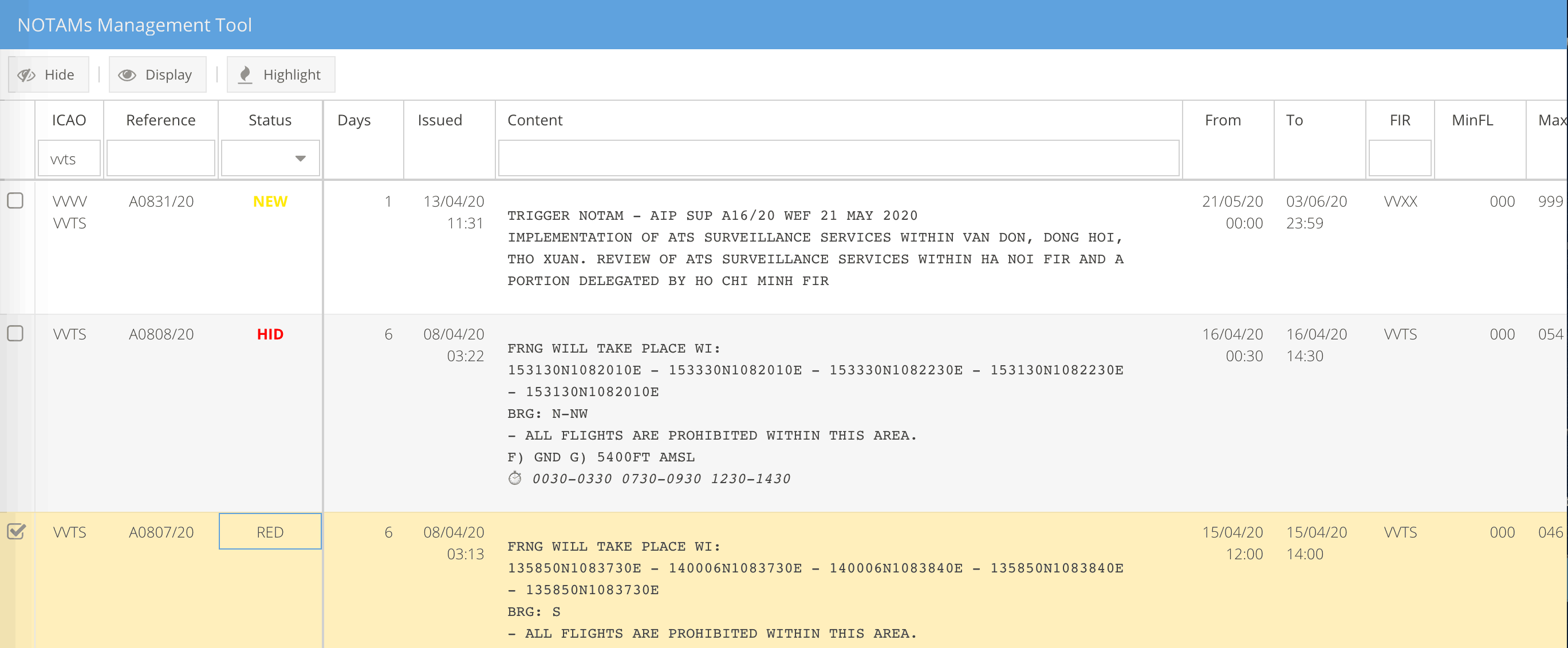
NOTAMs are essential safety information — but in raw form, they are also notoriously difficult to process quickly. A busy aerodrome can generate hundreds of NOTAMs, the vast majority irrelevant to any specific flight. NOTAMs Manager solves the signal-to-noise problem.
The problem
Raw NOTAM text requires significant interpretation:
- Hundreds of NOTAMs per aerodrome, most irrelevant to a specific operation
- Cryptic ICAO format that requires trained interpretation
- No distinction between safety-critical and administrative NOTAMs
- Time pressure during pre-flight to identify what actually matters
What NOTAMs Manager does
Intelligent filtering
NOTAMs are filtered against the specific flight: origin, destination, alternates, route, aircraft type, and operation category. The crew sees only NOTAMs that apply to their specific flight — nothing else.
Readable presentation
Raw NOTAM text is reformatted for readability while preserving technical accuracy. Critical information is highlighted. NOTAMs are organized by aerodrome and by operational significance.
Route-level NOTAM processing
En-route NOTAMs (airspace restrictions, navigation aid outages, special procedures) are filtered to the specific route — not a geographic bounding box that catches irrelevant content.
Integration with Flight Briefing
In the complete FEEL.AERO Flight Briefing environment, NOTAMs Manager is the NOTAM layer — delivering filtered, organized NOTAM content as part of the complete pre-flight briefing package.
Who uses NOTAMs Manager
Flight dispatchers who need to review and filter NOTAMs before releasing a flight. Pilots who need to review crew-relevant NOTAMs efficiently during pre-flight. Operations teams managing NOTAM compliance across a fleet.
Frequently asked questions
What NOTAM sources does NOTAMs Manager pull from?
NOTAMs Manager connects to standard aeronautical information sources. Specific source configuration is part of the implementation process.
How are NOTAMs filtered for relevance?
Filtering is based on route, aerodrome, aircraft type, and operation category. NOTAMs that do not apply to the specific flight are excluded from the crew-facing view.
Can operations teams use NOTAMs Manager separately from crew?
Yes. NOTAMs Manager has separate interfaces for pre-flight planning (operations staff) and crew consumption, with different filtering and presentation optimized for each use case.
Is NOTAMs Manager integrated with Flight Briefing?
Yes. NOTAMs Manager is a component of the Flight Briefing product and can also be deployed standalone.