sQRH 4.6 — crew rest on the lock screen
On an augmented-crew sector the crew-rest plan is decided long before the rest itself starts. Until now sQRH only knew about it once someone pressed Start Cruise at the right moment. Version 4.6 lets you set it up on the ground: press Start Cruise before the planned start — OUT plus the climb buffer from Settings — and the button turns amber and reads Armed. At the planned time the rest starts by itself, whether sQRH is on screen, in the background or closed, and the crew gets a notification. If the plan changes, a new OUT time moves the armed start with it; a tap on Armed starts the rest straight away.
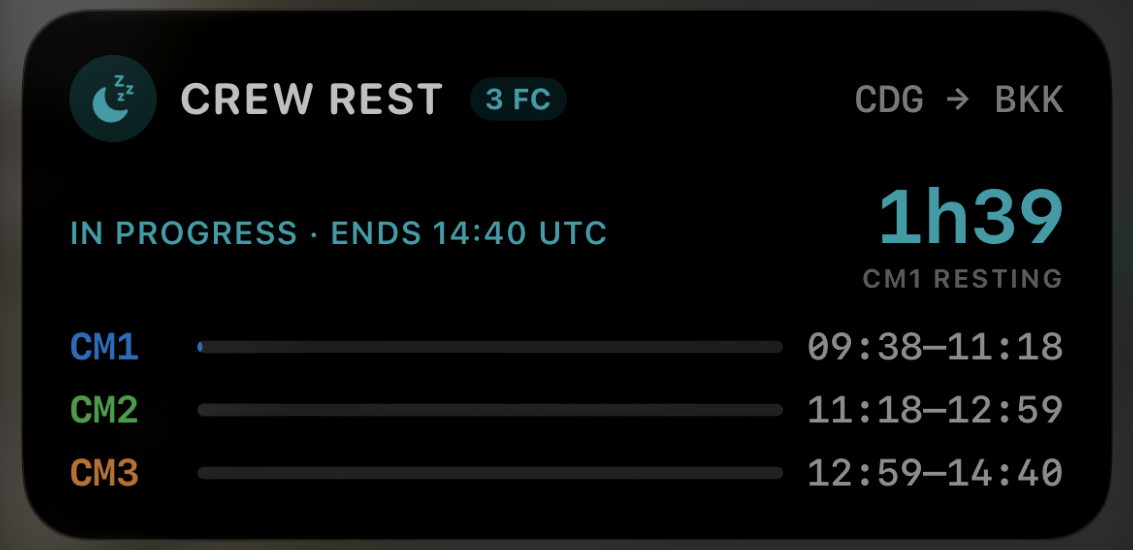
Once running, the rotation lives on the lock screen and in the Dynamic Island. The Live Activity shows who is resting, the time left in the current rest period as a compact “1h39”, and one bar per pilot filling as each rest goes by — every time in UTC, because that is what the flight plan and the logbook use. The countdown ticks on the dimmed always-on screen too. Notifications still mark the start, each change of pilot and the end of the window.
Sharing moves to Bluetooth. An FTL duty — sectors, crew and the crew rest, including an armed start — goes to a nearby iPhone or iPad with one tap, and the receiving device shows what is about to change before anything is replaced. The HOT timer, weather, temperature, fluid and flaps travel the same way, to sQRH or to No-ICE on iOS and Android. When a hold-over timer and a crew rest run at the same time, the hold-over timer takes the Dynamic Island.
The hold-over time module itself is redesigned: the timer stays pinned at the top while weather and fluid scroll beneath it, long precipitation names wrap instead of being cut, and the data source and temperature unit now live in Settings with the rest of the app’s preferences. sQRH 4.6 also refuses to run on a jailbroken iPhone or iPad, with checks that run entirely on the device.
As always, sQRH is an aid: the operator’s FTL scheme and the official hold-over tables govern. Full details on the sQRH app page, and the update is on the App Store.