Off 2 3.2 — what's out the window, the Sun in the sky, and a camera that follows your flight
Off 2 3.2 is now on the App Store for iPhone, iPad and Mac. It turns the globe into a window on what you are flying over, and like the rest of the app, all of it works without any network.
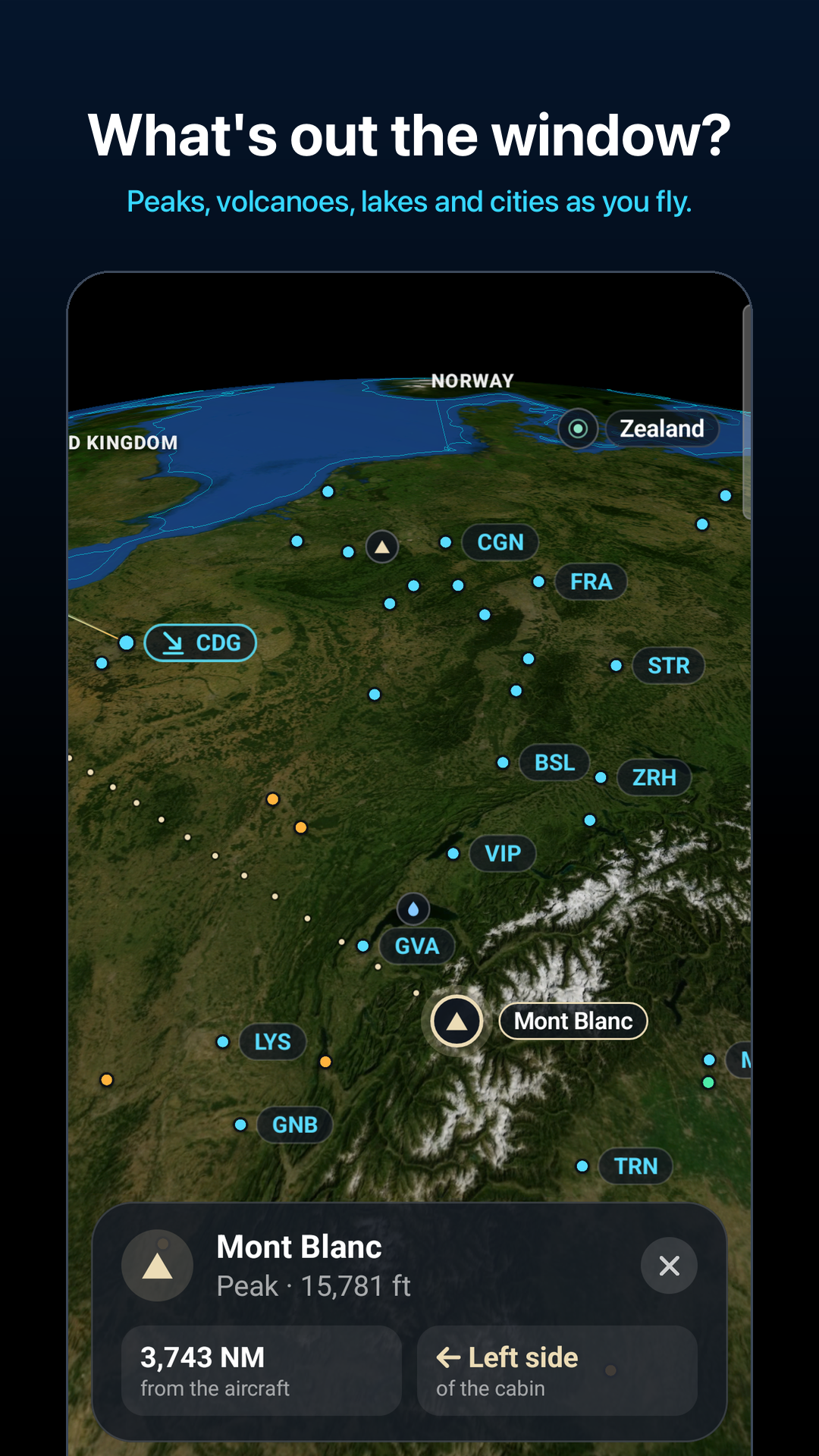
What’s out the window? In Pilot Mode, peaks, volcanoes, lakes, islands, cities and great landmarks now appear on the globe along your route, with seas, mountain ranges and regions named. Touch one and a card tells you how far it is from the aircraft, on which side of the cabin to look, and when you pass closest. You choose how much detail you want in Settings.
Tap the left side of the info panel and the camera follows your flight, keeping your aircraft in the centre of the globe until you touch it. With points of interest on, the view now and then glides down for a look at a place you are passing, as if from your window, then climbs back.
The Sun is on the globe, shining from its real direction, and the Moon’s lit side now faces it. Airports and the route line have a new look too: airports open a card with their codes, runway and elevation, the airports of your flight plan are framed, and the route turns smoothly at waypoints, shows the track already flown as dots, and colours the climb and the descent.
The same features are in Off 2 1.3 on Android, so the whole cabin sees the same thing. Full details on the Off 2 app page. Get the update on the App Store.