sFTL
Flight time limitations and in-flight crew rest for airline crews, on Android.

- The FDP limit as a clock time (latest on-blocks) with the planned margin, extension, split duty and commander discretion — EASA ORO.FTL, Tables 5 and 6, augmented crews with in-flight rest
- Crew rest rotation for 3 or 4 pilots with alerts and an ongoing lock-screen notification; Nearby Share sends the whole duty to sFTL on Android and sQRH on iPhone and iPad over Bluetooth
- Android 8.0+, phones and tablets, works fully offline — no data collected
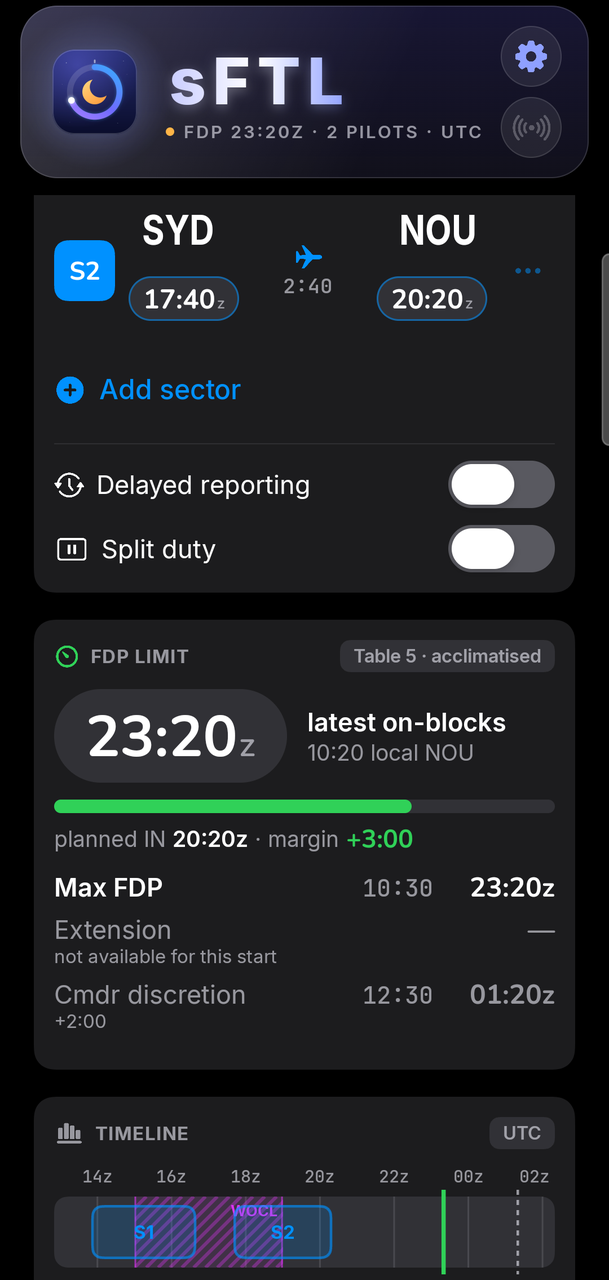
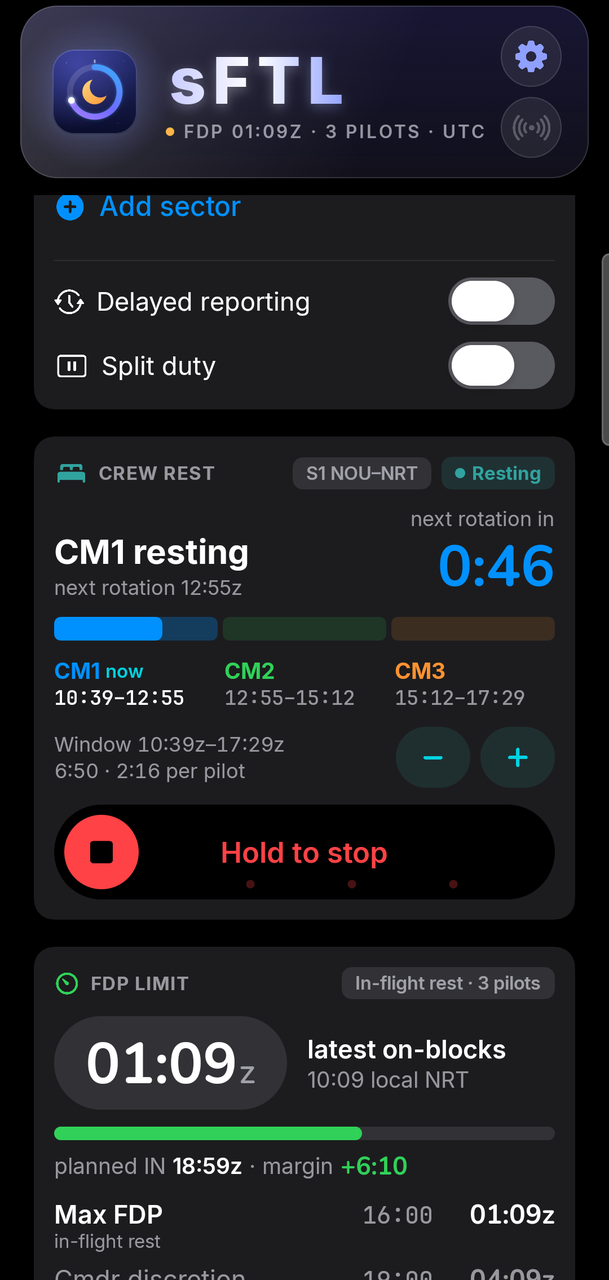
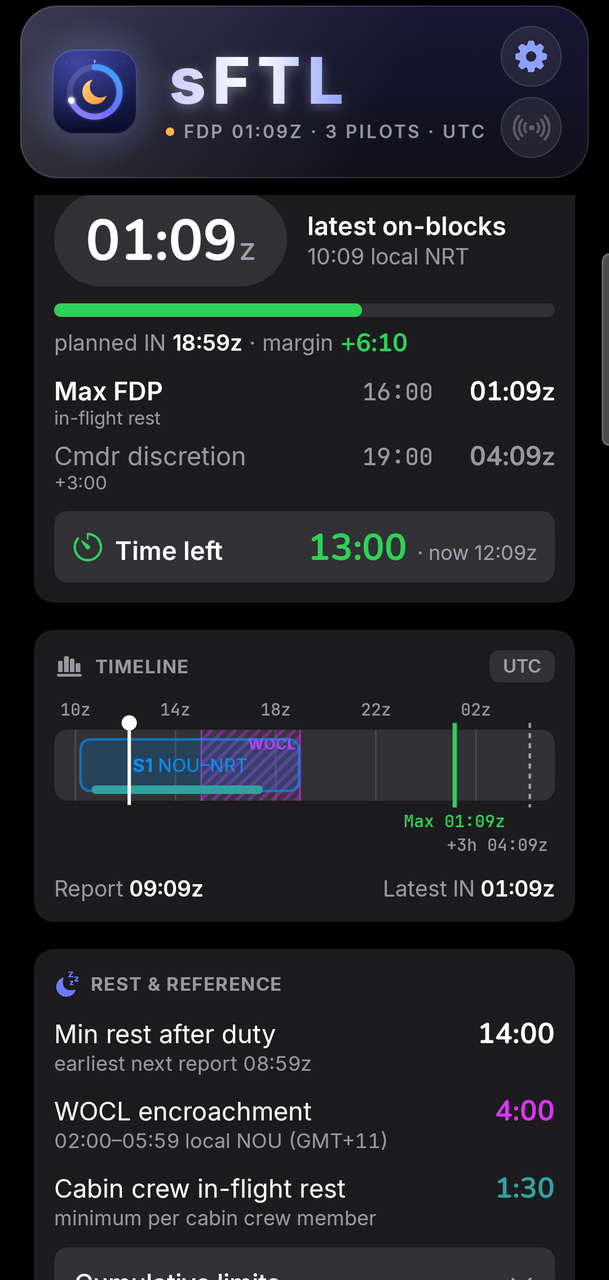
sFTL is the flight time limitations companion for airline crews on Android. Enter your report time and sectors, and it answers the one question that matters during a duty: what is the latest on-blocks time? It is the Android version of the FTL module of sQRH, with the same engine, the same screens and the same Nearby Share — so a crew with iPhones and Android phones works from one duty.
The answer first
- FDP limit as a clock time — latest on-blocks in UTC or local time, with the local time at the last arrival
- Planned margin on one status scale: green from 1:00, amber from 0:30, red below 0:30 or over the limit
- Every option with its own clock time — commander extension, split duty, commander discretion
- Time left counts down live while you are on duty
EASA ORO.FTL
- Acclimatised (Table 5) and unknown state of acclimatisation (Table 6), with hours since last landing
- Augmented flight crew with in-flight rest: 3 or 4 pilots, limited to 3 sectors
- Flight crew and cabin crew, delayed reporting and split duty
- Minimum rest after duty with the earliest next report, WOCL encroachment, cumulative limits for reference
Sectors and timeline
- Up to 10 sectors with airport search and automatic local times from a built-in airport database
- Times on a numeric keypad with ±1 / ±10 minute nudges; the report time asks yesterday, today or tomorrow
- Duties crossing midnight are dated automatically
- A clock-time timeline with sectors, the crew rest window, WOCL, every limit and a “now” cursor
Crew rest
For augmented crews, sFTL plans the rest rotation on the sector that carries crew rest — the longest one by default — and runs it: arm the cruise for the planned start or start it now, follow the current rest period and the next rotation, nudge the start by a minute, and hold to stop. Alerts fire before and at the end of each rest period, and an ongoing notification keeps the current period and its countdown on the lock screen, even with the app closed.
Nearby Share
When another device with sFTL or sQRH open is within Bluetooth range, the share button in the header shows how many devices are nearby. One tap sends the whole duty, sectors and crew rest. No pairing, no network, no server — and the receiver always confirms before anything changes.
Platform support
| Platform | Minimum version |
|---|---|
| Android phones and tablets | Android 8.0+ |
Tablets get a two-column layout. Light and dark mode. English language. On Google Play.
Privacy
sFTL collects no data. There is no account, no telemetry and no server; all calculations run on the device, and Nearby Share goes directly from device to device over Bluetooth. Read the full privacy policy.
sFTL is an aid, not an authority: always cross-check against your operator’s approved FTL scheme and the applicable regulations.
Frequently asked questions
What is sFTL?
sFTL is the Android version of the flight time limitations (FTL) module of sQRH. It computes the maximum flight duty period for your duty under EASA ORO.FTL and shows it as the time that matters on the flight deck — the latest on-blocks time — together with the planned margin and every extension option.
Which rules does sFTL apply?
EASA ORO.FTL — Table 5 when acclimatised, Table 6 in an unknown state of acclimatisation, in-flight rest limits for augmented flight crews of 3 or 4 pilots, commander extension (Table 7), commander discretion, split duty, delayed reporting, minimum rest after duty and WOCL encroachment. Cumulative limits (ORO.FTL.210) are shown for reference. Flight crew and cabin crew are both supported.
How does the crew rest rotation work?
For an augmented crew, sFTL splits the rest window of the sector carrying crew rest between the pilots (3 pilots) or pairs (4 pilots), from OUT plus a climb buffer to IN minus a descent buffer. Arm the cruise for the planned start or start it now; sFTL then alerts before and at the end of each rest period and keeps an ongoing notification with the current period and its countdown, even with the app closed. Stopping requires a hold, so the alerts are never cancelled by accident.
Can I share my duty with a crew member on iPhone?
Yes. Nearby Share sends the whole duty — report time, sectors, crew, acclimatisation, delayed reporting, split duty and crew rest — to devices nearby running sFTL on Android or sQRH on iPhone and iPad, directly over Bluetooth, with no pairing and no network. The receiver sees a summary and accepts or declines.
Does sFTL need an internet connection?
No. The rules and the airport database are built into the app and every calculation runs on the device. The only online feature is an optional update banner, which asks Google Play whether a newer version exists when the device is online.
Does sFTL collect any data?
No. There is no account, no analytics, no advertising and no server. See the privacy policy for details.